

Train your team with knowledge resources
Explore the GDN Global Knowledge Base
Publish your Events in our Events Calendar
Keep your Organization Profile up to date
Modify your Personal Profile
Update your Communication Preferences
Update your organization profile. Available to the organization main contact only.
After logging in, navigate to ‘Organization Profile’ in the top menu and click ‘Edit Profile’. You can then edit details such as your organization’s name, logo, description, website, email, address, and more. Click the ‘Update’ button to save your changes. This information displays on the Signatory Directory, Patron Directory, and/or TRUST Hub, as applicable. For accuracy, we recommend reviewing and updating this information at least once a year.

Submit your next event to the GDN Events Calendar.
If you would like to spread the word about an upcoming event, you can share it with the GDN community through the GDN Events Calendar. Log in to your GDN Online Services and select ‘Submit an Event for the Events Calendar’ from the top menu.

Fill out the form by entering the event name, date, event link, description, a few keywords, and select a category from the dropdown menu. Before submitting, please review your information carefully and make any necessary edits as the details will appear on the calendar as submitted. Once reviewed, click the ‘Submit’ button.
Note: The GDN team will review your event before approving it and publishing it to the Events Calendar.

Access video recordings from past GDN Annual Meetings and webinars.
Log in to your GDN Online Services and from the top menu, hover over the ‘Resources’ tab and select ‘Video Library’.

You can search by the video title or the name of the presenter, and you can filter by category and by date/location. Alternatively, you can search by keywords such as “AI,” “interoperability,” or “digital,” and then click the ‘Search’ button. All corresponding results will appear below.
If you want to perform another search, you can reset your search by clicking the ‘Reset Search’ button.

Update your GDN personal profile.
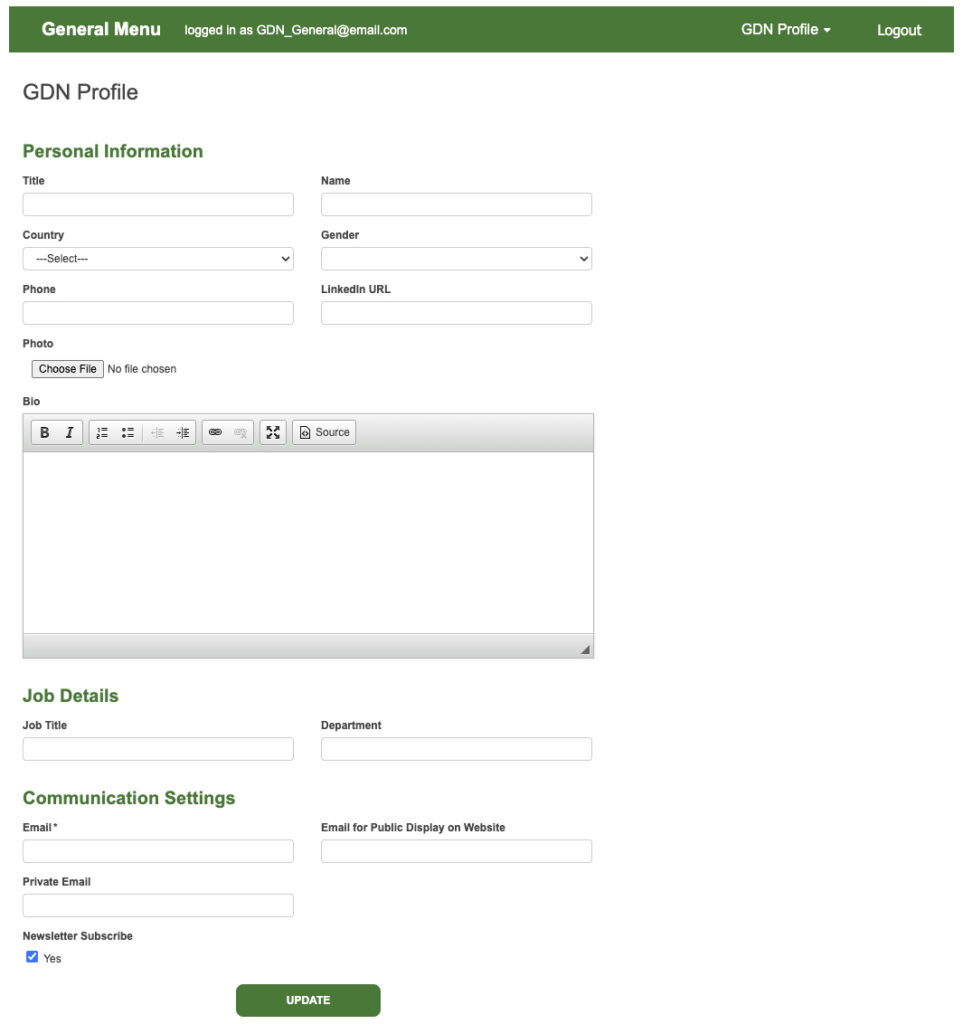
To update your personal profile information, log into your GDN Online Services, hover over ‘GDN Profile’ from the top menu and then select ‘Edit Profile’.

The form is divided into three sections: Personal Information, Job Details, and Communication Preferences.
Personal Information
Edit your title (such as Dr., if applicable), your name, gender, country, phone number, profile photo, LinkedIn URL, and a short bio paragraph.
Job Details
Continue filling out the form by adding your job title and department, if applicable.
Communications Settings
Add a primary email address (required). Optionally, you may add a private email address and an email for public display. Select ‘Yes’ if you would like to subscribe to our community updates and newsletter.
Review your information and click the ‘Update’ button to save your profile changes.
Update your communications preferences.
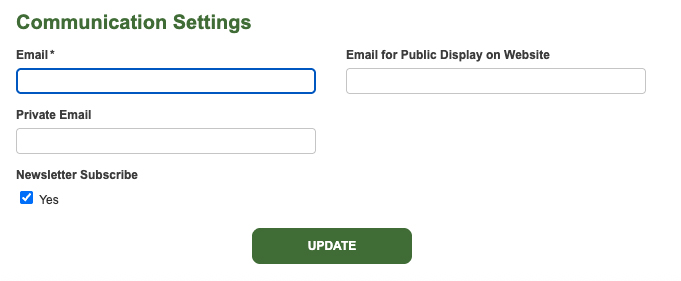
Log into your GDN Online Services, and from the top menu bar, hover over ‘GDN Profile’ and then select ‘Edit Profile’. Scroll down to the ‘Communication Settings’ section.
From there, you can update your primary email address (required), private email (optional), and email for public display on our website (optional). You can also subscribe to our community updates and newsletter in this section. Click the ‘Update’ button to save your changes.
Forgot your password? Reset your password.
On the GDN Online Services login page, click the ‘Reset your password here’ link.

Enter your email address and click the ‘Reset Password’ button.

You will receive an email from info@groningendeclration.org with a link to reset your password.

Click the link, enter a new password, and confirm it by typing it again. Click the ‘Submit’ button.

Then log in again with your new password.